
ASP.NET8 using DataTables.net – Part10 – New Plugins
A practical guide to using jQuery DataTables.net component in Asp.Net 8 MVC application.
Abstract: A practical guide to building an Asp.Net 8 MVC application that uses jQuery component DataTables.net. The article focuses on integrating different technologies (ASP.Net8, MVC, C#, Bootstrap 5, jQuery DataTables.net) into a professional-level application.
1 ASP.NET8 using jQuery DataTables.net
I was searching for a freeware table component that would fit into my developing environment for my new project, which is ASP.NET8, C#, MVC, Bootstrap 5, EF. In a number of places, I saw mention of the jQuery DataTables.net component [1]. After shortly looking into different articles, I decided to create several prototype (proof-of-concept) applications to evaluate it for usage in my professional projects. These articles are the result of that evaluation.
1.1 Articles in this series
Articles in this series are:
- ASP.NET8 using DataTables.net – Part1 – Foundation
- ASP.NET8 using DataTables.net – Part2 – Action buttons
- ASP.NET8 using DataTables.net – Part3 – State saving
- ASP.NET8 using DataTables.net – Part4 – Multilingual
- ASP.NET8 using DataTables.net – Part5 – Passing additional parameters in AJAX
- ASP.NET8 using DataTables.net – Part6 – Returning additional parameters in AJAX
- ASP.NET8 using DataTables.net – Part7 – Buttons regular
- ASP.NET8 using DataTables.net – Part8 – Select rows
- ASP.NET8 using DataTables.net – Part9 – Advanced Filters
- ASP.NET8 using DataTables.net – Part10 – New Plugins
2 New version DataTables.net 2.2
2.1 New Plugins in DataTables.net 2.2
There are 2 new interesting plugins in version 2.2 that I wanted to test:
- Input Paging plugin
- Ordering sequence plugin
2.2 Final result
Let us present the result of this article prototyping in ASP.NET8, C#, MVC, Bootstrap 5 environment. Here is what you get:
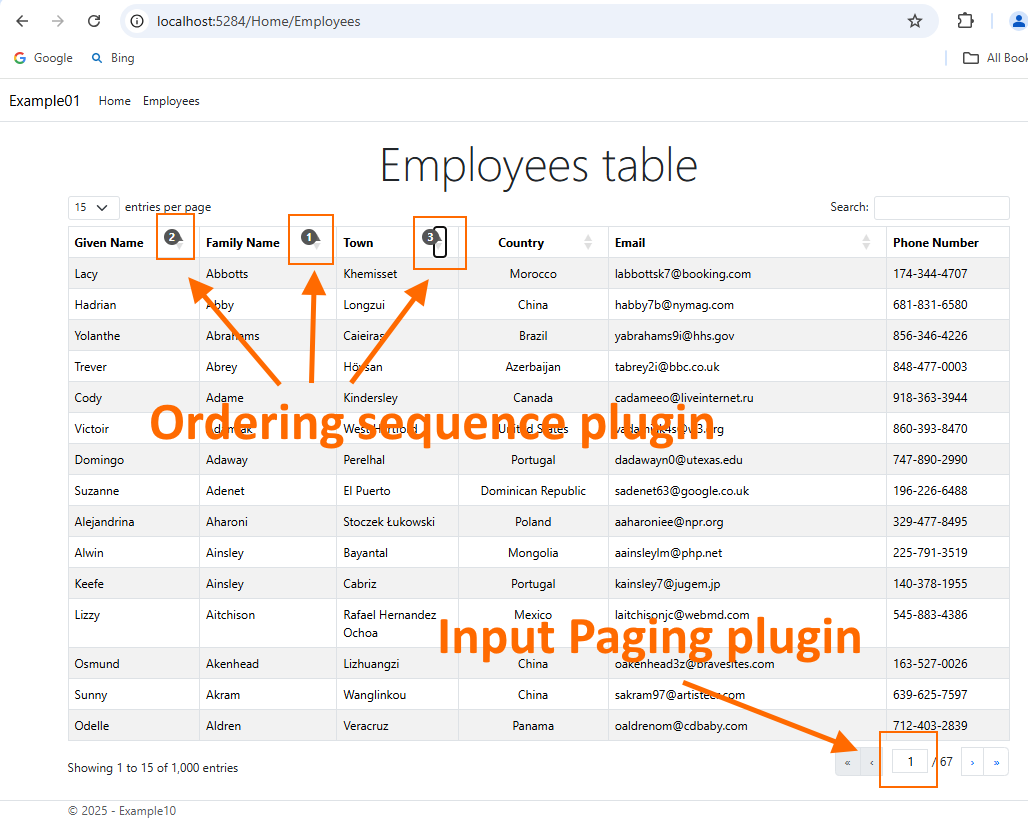
3 Installing plugin
Here is how you install plugins.

<!-- _LoadingDatatablesJsAndCss.cshtml -->
<link rel="stylesheet" href="~/lib/datatables/datatables.min.css" asp-append-version="true" />
<link rel="stylesheet" href="~/lib/datatables/plug-ins/2.2.1/features/inputPaging/dataTables.inputPaging.min.css" asp-append-version="true" />
<link rel="stylesheet" href="~/lib/datatables/plug-ins/2.2.1/features/orderNumbers/dataTables.orderNumbers.min.css" asp-append-version="true" />

<script src="~/lib/datatables/datatables.min.js" defer asp-append-version="true"></script>
<script src="~/lib/datatables/plug-ins/2.2.1/features/inputPaging/dataTables.inputPaging.min.js" defer asp-append-version="true"></script>
<script src="~/lib/datatables/plug-ins/2.2.1/features/orderNumbers/dataTables.orderNumbers.min.js" defer asp-append-version="true"></script>
And here is the main view, which invokes plugins.
<!-- Employees.cshtml -->
<partial name="_LoadingDatatablesJsAndCss" />

@{
    <div class="text-center">
        <h3 class="display-4">Employees table</h3>
    </div>

    <!-- Here is our table HTML element defined. JavaScript library Datatables
    will do all the magic to turn it into interactive component -->
    <table id="EmployeesTable01" class="table table-striped table-bordered ">
    </table>
}

<script type="text/javascript">
    // Datatables script initialization =========================================
    // we used defer attribute on jQuery so it might not be available at this point
    // so we go for vanilla JS event

    document.addEventListener("DOMContentLoaded", InitializeDatatable);

    function InitializeDatatable() {
        $("#EmployeesTable01").dataTable(
            //providing initialization parameters as JavaScript object
            {
                //processing-Feature control the processing indicator.
                processing: true,
                //paging-Enable or disable table pagination.
                //paging: true,
                //Input Paging plugin
                layout: {
                    bottomEnd: 'inputPaging'
                },
                //Ordering sequence plugin
                orderNumbers: true,
                //info-Feature control table information display field
                info: true,
                //ordering-Feature control ordering (sorting) abilities in DataTables.
                ordering: true,
                //searching-Feature control search (filtering) abilities
                searching: true,
                //search.return-Enable / disable DataTables' search on return.
                search: {
                    return: true
                },
                //autoWidth-Feature control DataTables' smart column width handling.
                autoWidth: true,
                //lengthMenu-Change the options in the page length select list.
                lengthMenu: [10, 15, 25, 50, 100],
                //pageLength-Change the initial page length (number of rows per page)
                pageLength: 15,

                //order-Initial order (sort) to apply to the table.
                order: [[1, 'asc']],

                //serverSide-Feature control DataTables' server-side processing mode.
                serverSide: true,

                //Load data for the table's content from an Ajax source.
                ajax: {
                    "url": "@Url.Action("EmployeesDT", "Home")",
                    "type": "POST",
                    "datatype": "json"
                },

                //Set column specific initialisation properties.
                columns: [
                    //name-Set a descriptive name for a column
                    //data-Set the data source for the column from the rows data object / array
                    //title-Set the column title
                    //orderable-Enable or disable ordering on this column
                    //searchable-Enable or disable search on the data in this column
                    //type-Set the column type - used for filtering and sorting string processing
                    //visible-Enable or disable the display of this column.
                    //width-Column width assignment.
                    //render-Render (process) the data for use in the table.
                    //className-Class to assign to each cell in the column.

                    {   //0
                        name: 'id',
                        data: 'id',
                        title: "Employee Id",
                        orderable: true,
                        searchable: false,
                        type: 'num',
                        visible: false
                    },
                    {
                        //1
                        name: 'givenName',
                        data: "givenName",
                        title: "Given Name",
                        orderable: true,
                        searchable: true,
                        type: 'string',
                        visible: true
                    },
                    {
                        //2
                        name: 'familyName',
                        data: "familyName",
                        title: "Family Name",
                        orderable: true,
                        searchable: true,
                        type: 'string',
                        visible: true
                    },
                    {
                        //3
                        name: 'town',
                        data: "town",
                        title: "Town",
                        orderable: true,
                        searchable: true,
                        type: 'string',
                        visible: true
                    },
                    {
                        //4
                        name: 'country',
                        data: "country",
                        title: "Country",
                        orderable: true,
                        searchable: true,
                        type: 'string',
                        visible: true,
                        width: "150px",
                        className: 'text-center '
                    },
                    {
                        //5
                        name: 'email',
                        data: "email",
                        title: "Email",
                        orderable: true,
                        searchable: true,
                        type: 'string',
                        visible: true
                    },
                    {
                        //6
                        name: 'phoneNo',
                        data: "phoneNo",
                        title: "Phone Number",
                        orderable: false,
                        searchable: true,
                        type: 'string',
                        visible: true
                    }
                ]
            } // end of initialization object
        );
    }
</script>
4 Conclusion
New plugins are interesting and users might like it. More details on configuration can be found at [1].